---
title: Edit asset usage status in Report app
description: Update the current status for your equipment in Report app from the Single Cooler View.
---
[Skip to content](https://support.aofrio.com/edit-asset-usage-status-in-report-app#main-content)
- [English](https://support.aofrio.com/edit-asset-usage-status-in-report-app)
- [Español - México](https://support.aofrio.com/es-mx/edit-asset-usage-status-in-report-app)
- [Português - Brasil](https://support.aofrio.com/pt-br/edit-asset-usage-status-in-report-app)
English
Show submenu for translations

Open main navigation
Close main navigation
- - [English](https://support.aofrio.com/edit-asset-usage-status-in-report-app)
- [Español - México](https://support.aofrio.com/es-mx/edit-asset-usage-status-in-report-app)
- [Português - Brasil](https://support.aofrio.com/pt-br/edit-asset-usage-status-in-report-app)
English
Show submenu for translations
- Contact us
Contact us
How can we help you?
- There are no suggestions because the search field is empty.
1. [Help Center](https://support.aofrio.com/?hsLang=en)
2. [About our software & platform](https://support.aofrio.com/about-our-software-platform?hsLang=en)
3. [Report app](https://support.aofrio.com/about-our-software-platform?hsLang=en#report-app)
February 17, 2026
# Edit asset usage status in Report app
## Update the current status for your equipment in Report app from the Single Cooler View.
NOTE: It is also possible to change the status of a cooler in Field app if you have been given the [appropriate provisioning permissions by your User Manager.](https://support.aofrio.com/enable-a-role-in-your-organization-to-use-field-app?hsLang=en)
1. Click on **Asset** in the main menu, then **Audit List** to view your fleet.
2. Click on the asset you want to update.
3. Click on the **Usage Status** field, then select one of the status options\*:
- In Service
- Production
- Warehouse
- Maintenance
- Lost
- Disabled
4. Click **SAVE** to confirm.
You can see a list of all your asset statuses under the **Capital** section of Report app.
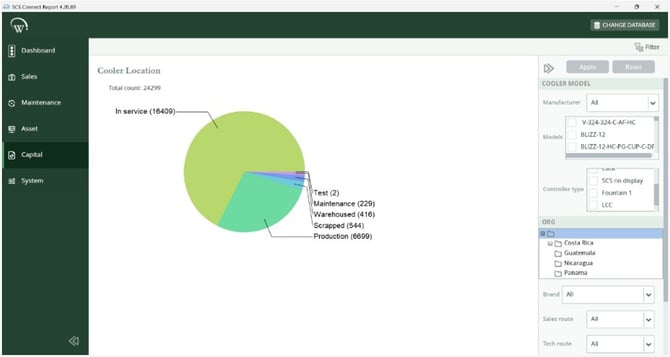
\*Status options can depend on your organization profile. Talk to your Customer Success manager for more detail.
- [Support for your role](https://support.aofrio.com/support-for-your-role?hsLang=en#main-content)
- [Service technician](https://support.aofrio.com/support-for-your-role?hsLang=en#service-technician)
- [Hardware installer](https://support.aofrio.com/support-for-your-role?hsLang=en#hardware-installer)
- [OEM buyer or engineer](https://support.aofrio.com/support-for-your-role?hsLang=en#oem-buyer-or-engineer)
- [Fleet manager](https://support.aofrio.com/support-for-your-role?hsLang=en#fleet-manager)
- [Food Safety manager](https://support.aofrio.com/support-for-your-role?hsLang=en#food-safety-manager)
- [Your AoFrio account](https://support.aofrio.com/support-for-your-role?hsLang=en#your-aofrio-account)
- [Frequently Asked Questions (FAQ)](https://support.aofrio.com/support-for-your-role?hsLang=en#frequently-asked-questions-faq)
- [Identify & recover lost assets](https://support.aofrio.com/identify-recover-lost-assets?hsLang=en#main-content)
- [Asset protection](https://support.aofrio.com/identify-recover-lost-assets?hsLang=en#asset-protection)
- [Asset identification & tracking](https://support.aofrio.com/identify-recover-lost-assets?hsLang=en#asset-identification-tracking)
- [Software & Firmware releases](https://support.aofrio.com/software-firmware-releases?hsLang=en#main-content)
- [Release notifications](https://support.aofrio.com/software-firmware-releases?hsLang=en#release-notifications)
- [Firmware for IoT hardware](https://support.aofrio.com/software-firmware-releases?hsLang=en#firmware-for-iot-hardware)
- [About our software & platform](https://support.aofrio.com/about-our-software-platform?hsLang=en#main-content)
- [General](https://support.aofrio.com/about-our-software-platform?hsLang=en#general)
- [iQ platform](https://support.aofrio.com/about-our-software-platform?hsLang=en#iq-platform)
- [Field app](https://support.aofrio.com/about-our-software-platform?hsLang=en#field-app)
- [Track app](https://support.aofrio.com/about-our-software-platform?hsLang=en#track-app)
- [Food Retail](https://support.aofrio.com/about-our-software-platform?hsLang=en#food-retail)
- [User Manager](https://support.aofrio.com/about-our-software-platform?hsLang=en#user-manager)
- [Report app](https://support.aofrio.com/about-our-software-platform?hsLang=en#report-app)
- [Lab app](https://support.aofrio.com/about-our-software-platform?hsLang=en#lab-app)
- [OEM Dashboard](https://support.aofrio.com/about-our-software-platform?hsLang=en#oem-dashboard)
- [Cradle app](https://support.aofrio.com/about-our-software-platform?hsLang=en#cradle-app)
- [Universal Programmer app](https://support.aofrio.com/about-our-software-platform?hsLang=en#universal-programmer-app)
- [IoT hardware](https://support.aofrio.com/iot-hardware?hsLang=en#main-content)
- [IoT ecosystem](https://support.aofrio.com/iot-hardware?hsLang=en#iot-ecosystem)
- [Gateway - LTE Cat M1 & LTE Cat 1 BIS](https://support.aofrio.com/iot-hardware?hsLang=en#gateway-lte-cat-m1-lte-cat-1-bis)
- [SCS Controller - General information](https://support.aofrio.com/iot-hardware?hsLang=en#scs-controller-general-information)
- [SCS 800 Controller](https://support.aofrio.com/iot-hardware?hsLang=en#scs-800-controller)
- [SCS 500 & 600 Controller](https://support.aofrio.com/iot-hardware?hsLang=en#scs-500-600-controller)
- [Monitor](https://support.aofrio.com/iot-hardware?hsLang=en#monitor)
- [Network Pro](https://support.aofrio.com/iot-hardware?hsLang=en#network-pro)
- [Compact LoRaWAN Temperature Sensor](https://support.aofrio.com/iot-hardware?hsLang=en#compact-lorawan-temperature-sensor)
- [LoRaWAN Gateway](https://support.aofrio.com/iot-hardware?hsLang=en#lorawan-gateway)
- [Mounting & commissioning hardware](https://support.aofrio.com/mounting-commissioning-hardware?hsLang=en#main-content)
- [General](https://support.aofrio.com/mounting-commissioning-hardware?hsLang=en#general)
- [Gateway](https://support.aofrio.com/mounting-commissioning-hardware?hsLang=en#gateway)
- [SCS Controller](https://support.aofrio.com/mounting-commissioning-hardware?hsLang=en#scs-controller)
- [Motors & fans](https://support.aofrio.com/mounting-commissioning-hardware?hsLang=en#motors-fans)
- [Temperature sensors](https://support.aofrio.com/mounting-commissioning-hardware?hsLang=en#temperature-sensors)
- [Network Pro](https://support.aofrio.com/mounting-commissioning-hardware?hsLang=en#network-pro)
- [IoT hardware operation & behavior](https://support.aofrio.com/iot-hardware-operation-behavior?hsLang=en#main-content)
- [Cellular & Bluetooth connectivity](https://support.aofrio.com/iot-hardware-operation-behavior?hsLang=en#cellular-bluetooth-connectivity)
- [Optimize cooler performance & energy use](https://support.aofrio.com/iot-hardware-operation-behavior?hsLang=en#optimize-cooler-performance-energy-use)
- [SCS Controller](https://support.aofrio.com/iot-hardware-operation-behavior?hsLang=en#scs-controller)
- [SCS Controller - Parameters](https://support.aofrio.com/iot-hardware-operation-behavior?hsLang=en#scs-controller-parameters)
- [SCS Controller - Faults & Alarms](https://support.aofrio.com/iot-hardware-operation-behavior?hsLang=en#scs-controller-faults-alarms)
- [Monitor](https://support.aofrio.com/iot-hardware-operation-behavior?hsLang=en#monitor)
- [Gateway](https://support.aofrio.com/iot-hardware-operation-behavior?hsLang=en#gateway)
- [Network Pro](https://support.aofrio.com/iot-hardware-operation-behavior?hsLang=en#network-pro)
- [Motors & fans](https://support.aofrio.com/motors-fans?hsLang=en#main-content)
- [General](https://support.aofrio.com/motors-fans?hsLang=en#general)
- [ECR 2 26W motor](https://support.aofrio.com/motors-fans?hsLang=en#ecr-2-26w-motor)
- [ECR 2 13W motor](https://support.aofrio.com/motors-fans?hsLang=en#ecr-2-13w-motor)
- [ECR 1 motor](https://support.aofrio.com/motors-fans?hsLang=en#ecr-1-motor)
- [ECR 82/92 motor](https://support.aofrio.com/motors-fans?hsLang=en#ecr-82-92-motor)
- [Fan packs - 13W applications](https://support.aofrio.com/motors-fans?hsLang=en#fan-packs-13w-applications)
- [Fan packs - 26W applications](https://support.aofrio.com/motors-fans?hsLang=en#fan-packs-26w-applications)
- [Other fans](https://support.aofrio.com/motors-fans?hsLang=en#other-fans)
- [Manuals & datasheets](https://support.aofrio.com/manuals-datasheets?hsLang=en#main-content)
- [IoT hardware](https://support.aofrio.com/manuals-datasheets?hsLang=en#iot-hardware)
- [Motors and fans](https://support.aofrio.com/manuals-datasheets?hsLang=en#motors-and-fans)
- [Software](https://support.aofrio.com/manuals-datasheets?hsLang=en#software)
- [Special access resources](https://support.aofrio.com/special-access-resources?hsLang=en#main-content)
- [General](https://support.aofrio.com/special-access-resources?hsLang=en#general)
[](https://aofrio.com/)
78 Apollo Drive, Rosedale, Auckland 0632
New Zealand
Copyright © 2025, AoFrio Limited