Skip to content
  • There are no suggestions because the search field is empty.

ALr 19 - How the 'Terminal Alarm' works

If the compressor in a cooler has run continuously for the configured time without reaching the setpoint temperature, the SCS Controller can switch off all the outputs to protect the asset and trigger an alarm (ALr 19). 

Review the fault logic for the "Terminal" or "Refrigeration Failure" alarm in the following graph:
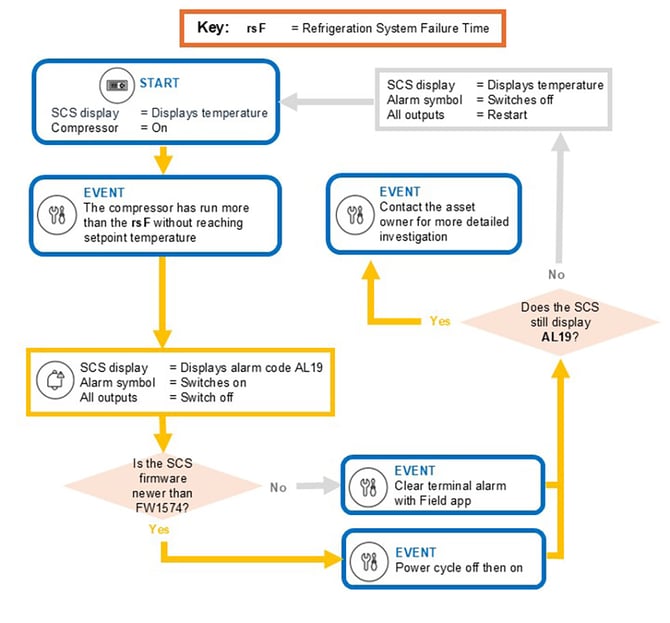
AL19 alarm logic

Possible causes and actions

The compressor has run continuously for the configured time without reaching the setpoint temperature. There are multiple possibilities preventing the system from achieving temperature.

  1. There are two actions:

How to clear the terminal alarm 

Fault Reference

ALr 19 · Terminal Alarm

SCS 500 / 600 Controller

ALARM ACTIVE
WHAT TRIGGERS IT

If the compressor runs continuously for the configured time without reaching the setpoint temperature, the SCS Controller switches off all outputs to protect the asset and raises ALr 19 — also called the Terminal or Refrigeration Failure alarm.

CLEAR THE ALARM
STEP 1

Connect

Log into Field app and connect to the SCS Controller you want to update.

STEP 2

Open Edit Parameters

Open the site menu and tap EDIT PARAMETERS.

STEP 3

Find Clear Terminal Alarm

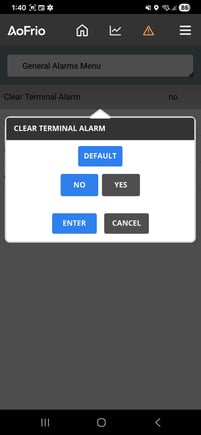
Select General Alarms Menu, then tap Clear Terminal Alarm.

Field app General Alarms Menu screen
GENERAL ALARMS MENU
Field app Clear Terminal Alarm confirmation screen, preview
UP NEXT
STEP 4

Confirm

Tap YES to clear the terminal alarm, then tap ENTER to confirm. The parameter status changes to “yes” and the alarm clears.

Field app Clear Terminal Alarm confirmation screen
CLEAR TERMINAL ALARM
Once the status reads “yes,” the alarm is cleared.
Not sure which firmware you're on? Check the current version from Field app under Firmware Update, or see the linked guide for firmware version 1574 and its release notes.