---
title: Mount a LoRaWAN temperature sensor in an assisted-service or serve-over-counter refrigerated display cabinet
description: A guide for locating a temperature sensor in a refrigerated display and sales cabinet that requires a person to serve the consumer with food products sold by the slice or packaged.
---
[Skip to content](https://support.aofrio.com/mount-a-temperature-sensor-in-a-assisted-service-refrigerated-display-cabinet-serve-over-counter#main-content)
- [English](https://support.aofrio.com/mount-a-temperature-sensor-in-a-assisted-service-refrigerated-display-cabinet-serve-over-counter)
- [Español - México](https://support.aofrio.com/es-mx/mount-a-temperature-sensor-in-a-assisted-service-refrigerated-display-cabinet-serve-over-counter)
- [Português - Brasil](https://support.aofrio.com/pt-br/mount-a-temperature-sensor-in-a-assisted-service-refrigerated-display-cabinet-serve-over-counter)
English
Show submenu for translations

Open main navigation
Close main navigation
- - [English](https://support.aofrio.com/mount-a-temperature-sensor-in-a-assisted-service-refrigerated-display-cabinet-serve-over-counter)
- [Español - México](https://support.aofrio.com/es-mx/mount-a-temperature-sensor-in-a-assisted-service-refrigerated-display-cabinet-serve-over-counter)
- [Português - Brasil](https://support.aofrio.com/pt-br/mount-a-temperature-sensor-in-a-assisted-service-refrigerated-display-cabinet-serve-over-counter)
English
Show submenu for translations
- Contact us
Contact us
How can we help you?
- There are no suggestions because the search field is empty.
1. [Help Center](https://support.aofrio.com/?hsLang=en)
2. [Mounting & commissioning hardware](https://support.aofrio.com/mounting-commissioning-hardware?hsLang=en)
3. [Temperature sensors](https://support.aofrio.com/mounting-commissioning-hardware?hsLang=en#temperature-sensors)
July 27, 2026
# Mount a LoRaWAN temperature sensor in an assisted-service or serve-over-counter refrigerated display cabinet
## A guide for locating a temperature sensor in a refrigerated display and sales cabinet that requires a person to serve the consumer with food products sold by the slice or packaged e.g. deli counter, appetizings counter
### Sensor activation prior to mounting
Because [LoRaWAN sensors](https://support.aofrio.com/lorawan-temperature-sensor-overview?hsLang=en) are powered off during shipment to comply with international shipping regulations, they need to be powered on and activated before mounting. This task is normally completed as part of quality assurance before the installation team receive the hardware.
1. Download the Milesight Toolbox app from the Google Play or the Apple store.
2. Open the Milesight Toolbox app on your mobile device and connect to the sensor with NFC to power it on. The app will display basic information and settings for the device if is recognized successfully.
3. Read and configure the device by tapping **Read/Write device** in the app.
NOTE: It’s not necessary to update the device password.
**Troubleshooting NFC setup**
If you have difficulty setting up the sensor, check:
- you are holding the mobile device close enough to the sensor while the app is turned on
- if it is inside a case or pouch that may be blocking the signal
If the mobile device still fails to read/write configurations via NFC, try moving further back (eg several feet) and try scanning again.
---
### Mount the sensor
1. Unplug the cabinet to turn it off, being careful to follow any local safety and security rules.
2. 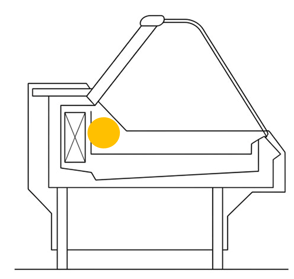Find the recommended location to mount the sensor 500 ± 200 mm from the end, preferably on the left side looking from the front. (The orange dot pictured below). For long cabinets, place a sensor every two doors (or approximately every 1.5m) apart.
3. Prepare the mounting locations by cleaning and drying the surface.
4. If using screws, hold up the sensor at the mounting location within the cabinet, then:
- Mark two holes on the cabinet surface in a horizontal line to match the screw holes.
- Drill screw holes according to the marks you have made.
- Attach sensor using screws.
**Install Address?** The install address is essential for accurate geolocation tracking and a number of reporting filters. When a service technician starts an installation task, they are guided through the outlet setup workflow - which includes the outlet address and device configuration for both the LoRaWAN Gateway and sensors. This is managed within the Technician view of the [AoFrio iQ mobile app for Food Retail](https://support.aofrio.com/food-retail-app-software-overview-download?hsLang=en), not the Field app used for other AoFrio IoT hardware.
- [Support for your role](https://support.aofrio.com/support-for-your-role?hsLang=en#main-content)
- [Service technician](https://support.aofrio.com/support-for-your-role?hsLang=en#service-technician)
- [Hardware installer](https://support.aofrio.com/support-for-your-role?hsLang=en#hardware-installer)
- [OEM buyer or engineer](https://support.aofrio.com/support-for-your-role?hsLang=en#oem-buyer-or-engineer)
- [Fleet manager](https://support.aofrio.com/support-for-your-role?hsLang=en#fleet-manager)
- [Food Safety manager](https://support.aofrio.com/support-for-your-role?hsLang=en#food-safety-manager)
- [Your AoFrio account](https://support.aofrio.com/support-for-your-role?hsLang=en#your-aofrio-account)
- [Frequently Asked Questions (FAQ)](https://support.aofrio.com/support-for-your-role?hsLang=en#frequently-asked-questions-faq)
- [Identify & recover lost assets](https://support.aofrio.com/identify-recover-lost-assets?hsLang=en#main-content)
- [Asset protection](https://support.aofrio.com/identify-recover-lost-assets?hsLang=en#asset-protection)
- [Asset identification & tracking](https://support.aofrio.com/identify-recover-lost-assets?hsLang=en#asset-identification-tracking)
- [Software & Firmware releases](https://support.aofrio.com/software-firmware-releases?hsLang=en#main-content)
- [Release notifications](https://support.aofrio.com/software-firmware-releases?hsLang=en#release-notifications)
- [Firmware for IoT hardware](https://support.aofrio.com/software-firmware-releases?hsLang=en#firmware-for-iot-hardware)
- [About our software & platform](https://support.aofrio.com/about-our-software-platform?hsLang=en#main-content)
- [General](https://support.aofrio.com/about-our-software-platform?hsLang=en#general)
- [iQ platform](https://support.aofrio.com/about-our-software-platform?hsLang=en#iq-platform)
- [Field app](https://support.aofrio.com/about-our-software-platform?hsLang=en#field-app)
- [Track app](https://support.aofrio.com/about-our-software-platform?hsLang=en#track-app)
- [Food Retail](https://support.aofrio.com/about-our-software-platform?hsLang=en#food-retail)
- [User Manager](https://support.aofrio.com/about-our-software-platform?hsLang=en#user-manager)
- [Report app](https://support.aofrio.com/about-our-software-platform?hsLang=en#report-app)
- [Lab app](https://support.aofrio.com/about-our-software-platform?hsLang=en#lab-app)
- [OEM Dashboard](https://support.aofrio.com/about-our-software-platform?hsLang=en#oem-dashboard)
- [Cradle app](https://support.aofrio.com/about-our-software-platform?hsLang=en#cradle-app)
- [Universal Programmer app](https://support.aofrio.com/about-our-software-platform?hsLang=en#universal-programmer-app)
- [IoT hardware](https://support.aofrio.com/iot-hardware?hsLang=en#main-content)
- [IoT ecosystem](https://support.aofrio.com/iot-hardware?hsLang=en#iot-ecosystem)
- [Gateway - LTE Cat M1 & LTE Cat 1 BIS](https://support.aofrio.com/iot-hardware?hsLang=en#gateway-lte-cat-m1-lte-cat-1-bis)
- [SCS Controller - General information](https://support.aofrio.com/iot-hardware?hsLang=en#scs-controller-general-information)
- [SCS 800 Controller](https://support.aofrio.com/iot-hardware?hsLang=en#scs-800-controller)
- [SCS 500 & 600 Controller](https://support.aofrio.com/iot-hardware?hsLang=en#scs-500-600-controller)
- [Monitor](https://support.aofrio.com/iot-hardware?hsLang=en#monitor)
- [Network Pro](https://support.aofrio.com/iot-hardware?hsLang=en#network-pro)
- [Compact LoRaWAN Temperature Sensor](https://support.aofrio.com/iot-hardware?hsLang=en#compact-lorawan-temperature-sensor)
- [LoRaWAN Gateway](https://support.aofrio.com/iot-hardware?hsLang=en#lorawan-gateway)
- [Mounting & commissioning hardware](https://support.aofrio.com/mounting-commissioning-hardware?hsLang=en#main-content)
- [General](https://support.aofrio.com/mounting-commissioning-hardware?hsLang=en#general)
- [Gateway](https://support.aofrio.com/mounting-commissioning-hardware?hsLang=en#gateway)
- [SCS Controller](https://support.aofrio.com/mounting-commissioning-hardware?hsLang=en#scs-controller)
- [Motors & fans](https://support.aofrio.com/mounting-commissioning-hardware?hsLang=en#motors-fans)
- [Temperature sensors](https://support.aofrio.com/mounting-commissioning-hardware?hsLang=en#temperature-sensors)
- [Network Pro](https://support.aofrio.com/mounting-commissioning-hardware?hsLang=en#network-pro)
- [IoT hardware operation & behavior](https://support.aofrio.com/iot-hardware-operation-behavior?hsLang=en#main-content)
- [Cellular & Bluetooth connectivity](https://support.aofrio.com/iot-hardware-operation-behavior?hsLang=en#cellular-bluetooth-connectivity)
- [Optimize cooler performance & energy use](https://support.aofrio.com/iot-hardware-operation-behavior?hsLang=en#optimize-cooler-performance-energy-use)
- [SCS Controller](https://support.aofrio.com/iot-hardware-operation-behavior?hsLang=en#scs-controller)
- [SCS Controller - Parameters](https://support.aofrio.com/iot-hardware-operation-behavior?hsLang=en#scs-controller-parameters)
- [SCS Controller - Faults & Alarms](https://support.aofrio.com/iot-hardware-operation-behavior?hsLang=en#scs-controller-faults-alarms)
- [Monitor](https://support.aofrio.com/iot-hardware-operation-behavior?hsLang=en#monitor)
- [Gateway](https://support.aofrio.com/iot-hardware-operation-behavior?hsLang=en#gateway)
- [Network Pro](https://support.aofrio.com/iot-hardware-operation-behavior?hsLang=en#network-pro)
- [Motors & fans](https://support.aofrio.com/motors-fans?hsLang=en#main-content)
- [General](https://support.aofrio.com/motors-fans?hsLang=en#general)
- [ECR 2 26W motor](https://support.aofrio.com/motors-fans?hsLang=en#ecr-2-26w-motor)
- [ECR 2 13W motor](https://support.aofrio.com/motors-fans?hsLang=en#ecr-2-13w-motor)
- [ECR 1 motor](https://support.aofrio.com/motors-fans?hsLang=en#ecr-1-motor)
- [ECR 82/92 motor](https://support.aofrio.com/motors-fans?hsLang=en#ecr-82-92-motor)
- [Fan packs - 13W applications](https://support.aofrio.com/motors-fans?hsLang=en#fan-packs-13w-applications)
- [Fan packs - 26W applications](https://support.aofrio.com/motors-fans?hsLang=en#fan-packs-26w-applications)
- [Other fans](https://support.aofrio.com/motors-fans?hsLang=en#other-fans)
- [Manuals & datasheets](https://support.aofrio.com/manuals-datasheets?hsLang=en#main-content)
- [IoT hardware](https://support.aofrio.com/manuals-datasheets?hsLang=en#iot-hardware)
- [Motors and fans](https://support.aofrio.com/manuals-datasheets?hsLang=en#motors-and-fans)
- [Software](https://support.aofrio.com/manuals-datasheets?hsLang=en#software)
- [Special access resources](https://support.aofrio.com/special-access-resources?hsLang=en#main-content)
- [General](https://support.aofrio.com/special-access-resources?hsLang=en#general)
[](https://aofrio.com/)
78 Apollo Drive, Rosedale, Auckland 0632
New Zealand
Copyright © 2025, AoFrio Limited