
Sensor activation prior to mounting
Because LoRaWAN sensors are powered off during shipment to comply with international shipping regulations, they need to be powered on and activated before mounting. This task is normally completed as part of quality assurance before the installation team receive the hardware.
-
 Download the Milesight Toolbox app from the Google Play or the Apple store.
 -
Open the Milesight Toolbox app on your mobile device and connect to the sensor with NFC to power it on. The app will display basic information and settings for the device if is recognized successfully.
-
Read and configure the device by tapping Read/Write device in the app.
-
NOTE: It’s not necessary to update the device password.
Troubleshooting NFC setup
If you have difficulty setting up the sensor, check:
-
you are holding the mobile device close enough to the sensor while the app is turned on
-
if it is inside a case or pouch that may be blocking the signal
If the mobile device still fails to read/write configurations via NFC, try moving further back (eg several feet) and try scanning again.
 Mount the sensor
- Unplug the cabinet to turn it off, being careful to follow any local safety and security rules.
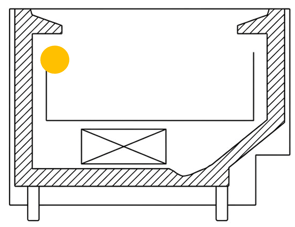
- Find the recommended location to mount the sensor 500 ± 200 mm from the end, preferably on the left side looking from the front. (The orange dot pictured here). For long cabinets, place a sensor every two doors (or approximately every 1.5m) apart.
- Prepare the mounting locations by cleaning and drying the surface.
- If using screws, hold up the sensor at the mounting location within the cabinet, then:
- Mark two holes on the cabinet surface in a horizontal line to match the screw holes.
- Drill screw holes according to the marks you have made.
- Attach sensor using screws.
Install Address? The install address is essential for accurate geolocation tracking and a number of reporting filters. When a service technician starts an installation task, they are guided through the outlet setup workflow - which includes the outlet address and device configuration for both the LoRaWAN Gateway and sensors. This is managed within the Technician view of the AoFrio iQ mobile app for Food Retail, not the Field app used for other AoFrio IoT hardware.