---
title: How to use the buttons and display on your SCS 600 Controller
description: Change the temperature, turn lights or standby on and off, start or cancel a defrost, and read display codes on an SCS 600 Controller using its front buttons.
---
[Skip to content](https://support.aofrio.com/standard-operation-for-the-scs-controller#main-content)
- [English](https://support.aofrio.com/standard-operation-for-the-scs-controller)
- [Español - México](https://support.aofrio.com/es-mx/operación-estándar-para-el-controlador-scs)
- [Português - Brasil](https://support.aofrio.com/pt-br/operação-padrão-para-controlador-scs)
English
Show submenu for translations

Open main navigation
Close main navigation
- - [English](https://support.aofrio.com/standard-operation-for-the-scs-controller)
- [Español - México](https://support.aofrio.com/es-mx/operación-estándar-para-el-controlador-scs)
- [Português - Brasil](https://support.aofrio.com/pt-br/operação-padrão-para-controlador-scs)
English
Show submenu for translations
- Contact us
Contact us
How can we help you?
- There are no suggestions because the search field is empty.
1. [Help Center](https://support.aofrio.com/?hsLang=en)
2. [IoT hardware operation & behavior](https://support.aofrio.com/iot-hardware-operation-behavior?hsLang=en)
3. [SCS Controller](https://support.aofrio.com/iot-hardware-operation-behavior?hsLang=en#scs-controller)
October 18, 2026
# How to use the buttons and display on your SCS 600 Controller
## Change the temperature, turn lights or standby on and off, start or cancel a defrost, and read display codes on an SCS 600 Controller using its front buttons.
You don't need the [Field app](https://support.aofrio.com/field-app-software-overview?hsLang=en) for these tasks. If a button does nothing, the keypad may be locked (see the [**Before you start**](https://support.aofrio.com/standard-operation-for-the-scs-controller#before) section on this page).
### Before you start
- The controller must be powered on and showing the cabinet temperature.
- The keypad lock decides which buttons work. By default it's set to **Set Point Locked**: lights, standby and defrost work, but you can't change the setpoint. **Fully Locked** blocks all four tasks; **Unlocked** allows them all.
- If a button doesn't respond, the keypad is probably locked. By default only the set point is locked.
- A technician can change the keypad lock (parameter **uSL**) in the [Field app](https://support.aofrio.com/read-parameter-files-using-field-app?hsLang=en).
- Access to the Field and [Track](https://support.aofrio.com/track-app-software-overview?hsLang=en) apps is set by role in [User Manager](https://support.aofrio.com/user-manager-software-overview?hsLang=en).
### Limitations
- You can only set the temperature between the minimum and maximum user setpoints. By default this is 2.0°C to 6.0°C (35.6°F to 42.8°F). A technician can change these limits in the Field app.
- Other settings, such as defrost timing, alarm thresholds and standby schedules, are changed in the [Field app](https://support.aofrio.com/read-parameter-files-using-field-app?hsLang=en).
- If Long Touch Disable is turned on (firmware 4028.2 or later), holding **Left** and **Right** together for 2 seconds shuts the cooler down and logs ALr 48. To restart, hold both buttons for 2 seconds again or switch the power off and on. To prevent accidental shutdowns, a technician can turn off Long Touch in the Field or Cradle app.
### What you can do with the buttons
Start with the display showing the cabinet temperature. Any change returns to the temperature after 5 seconds with no button presses.
| To do this | Press | What you'll see |
| --- | --- | --- |
| Show the setpoint | **Up** or **Down**, briefly | Display switches from temperature to setpoint |
| Change the setpoint | **Up** or **Down** while the setpoint shows | Setpoint moves 0.1°C per press and saves after 5 seconds |
| Turn the lights on or off | **Left**, briefly | Lights switch on or off |
| Turn standby (night) mode on or off | **Left**, press and hold | Night mode indicator (1) turns on or off |
| Start a defrost | **Right**, press and hold | Snowflake indicator (10) lights up and the display shows **dEF** |
| Cancel a defrost | **Left**, hold for several seconds during a defrost | Display shows **nor** and the snowflake turns off |
| Shut down or restart the cooler | **Left** and **Right** together for 2 seconds | All outputs (compressor, fans, lights) turn off, the alarm indicator (8) lights and the display shows **OFF**. Repeat to restart. Only works if Long Touch Disable is turned on (firmware 4028.2 or later). |
The **Left** button does different things depending on how long you hold it: a brief press switches the lights, a long press switches standby or cancels a running defrost.
### Change the temperature
1. Check the display shows the cabinet temperature.
2. Briefly press **Up** or **Down**. The display switches to the setpoint.
3. Press **Up** or **Down** again to raise or lower the setpoint by 0.1°C (0.18°F) per press.
4. Stop pressing. After 5 seconds the display returns to the temperature and your new setpoint is saved.
If the setpoint stops moving, you've reached the allowed limit (see Limitations). If it won't change at all, the setpoint is locked.
### Start or cancel a defrost
**To start a defrost:** press and hold **Right** until the snowflake indicator (10) lights up.
**To cancel a defrost:**
1. Check the snowflake indicator (10) is lit and the display shows **dEF**.
2. Press and hold **Left** for several seconds.
3. Check the display shows **nor** (Normal Mode) and the snowflake is off.
### Turn the lights or standby mode on or off
- **Lights:** briefly press **Left**.
- **Standby (night) mode:** press and hold **Left**. The night mode indicator (1) shows when it's on.
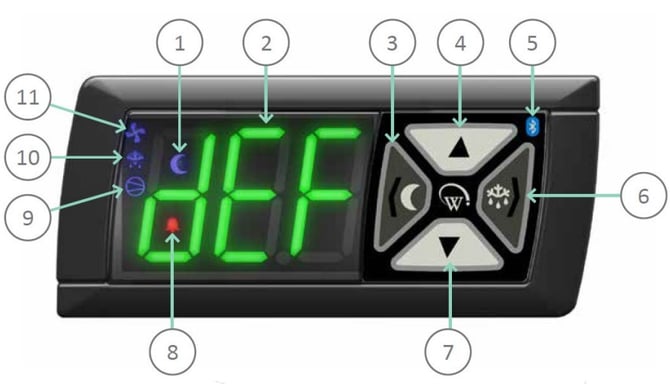
### Read the display
The numbers match the image of the front panel.
| No. | Element | What it means |
| --- | --- | --- |
| 1 | Night mode indicator | Lit when standby (night) mode is on |
| 2 | Display | Shows the cabinet temperature, setpoint or a three-letter code (see below) |
| 3 | **Left** button | Back and abort; lights (brief press); standby, night mode and cancel defrost (long press) |
| 4 | **Up** button | Scroll up; show or raise the setpoint |
| 5 | Bluetooth indicator | Lit when a phone with an AoFrio app is connected |
| 6 | **Right** button | Next and enter; start a defrost (long press) |
| 7 | **Down** button | Scroll down; show or lower the setpoint |
| 8 | Alarm indicator | Lit while an alarm is active |
| 9 | Compressor indicator | Lit when the compressor is connected |
| 10 | Defrost indicator (snowflake) | Lit while the cooler is defrosting |
| 11 | Fan indicator | Lit when the fan is connected |
### Common display codes
| Code | Meaning | More information |
| --- | --- | --- |
| **nor** | Normal Mode | [How SCS Controller modes work](https://support.aofrio.com/how-standard-scs-controller-modes-work?hsLang=en) |
| **dEF** | Defrost running | [Cancel defrost](https://support.aofrio.com/cancel-defrost-on-a-cooler-with-an-installed-scs-500/600-controller?hsLang=en) |
| **OFF** | Manual shutdown (ALr 48); hold **Left** and **Right** for 2 seconds to restart | [ALr 48 – Manual shutdown](https://support.aofrio.com/alr-48-?hsLang=en) |
| **dor** | Door open; close the door | [Door Open alarm](https://support.aofrio.com/how-the-door-open-alarm-works?hsLang=en) |
| **ALr 8** | Low product temperature | [Alarm logic](https://support.aofrio.com/alarm-logic-for-coolers-with-installed-scs-controllers?hsLang=en) |
| **ALr 9** | High product temperature | [Alarm logic](https://support.aofrio.com/alarm-logic-for-coolers-with-installed-scs-controllers?hsLang=en) |
| **ALr 14** | Condenser over temperature | [Condenser over temp alarm](https://support.aofrio.com/how-the-condenser-over-temp-alarm-works?hsLang=en) |
| **ALr 17** | Temperature sensor (NTC) failure | [NTC Failure alarm](https://support.aofrio.com/how-the-ntc-failure-alarm-works?hsLang=en) |
| **ALr 19** | Refrigeration failure (terminal alarm) | [Terminal alarm](https://support.aofrio.com/al19-how-the-terminal-alarm-works?hsLang=en) |
| **ALr 20** | Return air under temperature | [Return Air Under Temperature alarm](https://support.aofrio.com/how-the-return-air-under-temperature-alarm-works?hsLang=en) |
| **ALr 21** | Too many compressor starts | [Max Compressor Starts alarm](https://support.aofrio.com/al21-how-the-max-compressor-starts-alarm-works?hsLang=en) |
| **-** or **--** | Temperature above or below the displayable range | [Display parameters](https://support.aofrio.com/display-parameters-on-the-scs-controller?hsLang=en) |
For every alarm code, see [Alarm logic for coolers with SCS Controllers](https://support.aofrio.com/alarm-logic-for-coolers-with-installed-scs-controllers?hsLang=en). For every display and parameter code, see the [SCS Controller Standard Parameters manual (PDF)](https://support.aofrio.com/hubfs/User%20manuals/AoFrio%20WT9753_i12%2003_2023%20SCS%20Controller%20UserManual_StandardParameters.pdf?hsLang=en).
- [Support for your role](https://support.aofrio.com/support-for-your-role?hsLang=en#main-content)
- [Service technician](https://support.aofrio.com/support-for-your-role?hsLang=en#service-technician)
- [Hardware installer](https://support.aofrio.com/support-for-your-role?hsLang=en#hardware-installer)
- [OEM buyer or engineer](https://support.aofrio.com/support-for-your-role?hsLang=en#oem-buyer-or-engineer)
- [Fleet manager](https://support.aofrio.com/support-for-your-role?hsLang=en#fleet-manager)
- [Food Safety manager](https://support.aofrio.com/support-for-your-role?hsLang=en#food-safety-manager)
- [Your AoFrio account](https://support.aofrio.com/support-for-your-role?hsLang=en#your-aofrio-account)
- [Frequently Asked Questions (FAQ)](https://support.aofrio.com/support-for-your-role?hsLang=en#frequently-asked-questions-faq)
- [Identify & recover lost assets](https://support.aofrio.com/identify-recover-lost-assets?hsLang=en#main-content)
- [Asset protection](https://support.aofrio.com/identify-recover-lost-assets?hsLang=en#asset-protection)
- [Asset identification & tracking](https://support.aofrio.com/identify-recover-lost-assets?hsLang=en#asset-identification-tracking)
- [Software & Firmware releases](https://support.aofrio.com/software-firmware-releases?hsLang=en#main-content)
- [Release notifications](https://support.aofrio.com/software-firmware-releases?hsLang=en#release-notifications)
- [Firmware for IoT hardware](https://support.aofrio.com/software-firmware-releases?hsLang=en#firmware-for-iot-hardware)
- [About our software & platform](https://support.aofrio.com/about-our-software-platform?hsLang=en#main-content)
- [General](https://support.aofrio.com/about-our-software-platform?hsLang=en#general)
- [iQ platform](https://support.aofrio.com/about-our-software-platform?hsLang=en#iq-platform)
- [Field app](https://support.aofrio.com/about-our-software-platform?hsLang=en#field-app)
- [Track app](https://support.aofrio.com/about-our-software-platform?hsLang=en#track-app)
- [Food Retail](https://support.aofrio.com/about-our-software-platform?hsLang=en#food-retail)
- [User Manager](https://support.aofrio.com/about-our-software-platform?hsLang=en#user-manager)
- [Report app](https://support.aofrio.com/about-our-software-platform?hsLang=en#report-app)
- [Lab app](https://support.aofrio.com/about-our-software-platform?hsLang=en#lab-app)
- [OEM Dashboard](https://support.aofrio.com/about-our-software-platform?hsLang=en#oem-dashboard)
- [Cradle app](https://support.aofrio.com/about-our-software-platform?hsLang=en#cradle-app)
- [Universal Programmer app](https://support.aofrio.com/about-our-software-platform?hsLang=en#universal-programmer-app)
- [IoT hardware](https://support.aofrio.com/iot-hardware?hsLang=en#main-content)
- [IoT ecosystem](https://support.aofrio.com/iot-hardware?hsLang=en#iot-ecosystem)
- [Gateway - LTE Cat M1 & LTE Cat 1 BIS](https://support.aofrio.com/iot-hardware?hsLang=en#gateway-lte-cat-m1-lte-cat-1-bis)
- [SCS Controller - General information](https://support.aofrio.com/iot-hardware?hsLang=en#scs-controller-general-information)
- [SCS 800 Controller](https://support.aofrio.com/iot-hardware?hsLang=en#scs-800-controller)
- [SCS 500 & 600 Controller](https://support.aofrio.com/iot-hardware?hsLang=en#scs-500-600-controller)
- [Monitor](https://support.aofrio.com/iot-hardware?hsLang=en#monitor)
- [Network Pro](https://support.aofrio.com/iot-hardware?hsLang=en#network-pro)
- [Compact LoRaWAN Temperature Sensor](https://support.aofrio.com/iot-hardware?hsLang=en#compact-lorawan-temperature-sensor)
- [LoRaWAN Gateway](https://support.aofrio.com/iot-hardware?hsLang=en#lorawan-gateway)
- [Mounting & commissioning hardware](https://support.aofrio.com/mounting-commissioning-hardware?hsLang=en#main-content)
- [General](https://support.aofrio.com/mounting-commissioning-hardware?hsLang=en#general)
- [Gateway](https://support.aofrio.com/mounting-commissioning-hardware?hsLang=en#gateway)
- [SCS Controller](https://support.aofrio.com/mounting-commissioning-hardware?hsLang=en#scs-controller)
- [Motors & fans](https://support.aofrio.com/mounting-commissioning-hardware?hsLang=en#motors-fans)
- [Temperature sensors](https://support.aofrio.com/mounting-commissioning-hardware?hsLang=en#temperature-sensors)
- [Network Pro](https://support.aofrio.com/mounting-commissioning-hardware?hsLang=en#network-pro)
- [IoT hardware operation & behavior](https://support.aofrio.com/iot-hardware-operation-behavior?hsLang=en#main-content)
- [Cellular & Bluetooth connectivity](https://support.aofrio.com/iot-hardware-operation-behavior?hsLang=en#cellular-bluetooth-connectivity)
- [Optimize cooler performance & energy use](https://support.aofrio.com/iot-hardware-operation-behavior?hsLang=en#optimize-cooler-performance-energy-use)
- [SCS Controller](https://support.aofrio.com/iot-hardware-operation-behavior?hsLang=en#scs-controller)
- [SCS Controller - Parameters](https://support.aofrio.com/iot-hardware-operation-behavior?hsLang=en#scs-controller-parameters)
- [SCS Controller - Faults & Alarms](https://support.aofrio.com/iot-hardware-operation-behavior?hsLang=en#scs-controller-faults-alarms)
- [Monitor](https://support.aofrio.com/iot-hardware-operation-behavior?hsLang=en#monitor)
- [Gateway](https://support.aofrio.com/iot-hardware-operation-behavior?hsLang=en#gateway)
- [Network Pro](https://support.aofrio.com/iot-hardware-operation-behavior?hsLang=en#network-pro)
- [Motors & fans](https://support.aofrio.com/motors-fans?hsLang=en#main-content)
- [General](https://support.aofrio.com/motors-fans?hsLang=en#general)
- [ECR 2 26W motor](https://support.aofrio.com/motors-fans?hsLang=en#ecr-2-26w-motor)
- [ECR 2 13W motor](https://support.aofrio.com/motors-fans?hsLang=en#ecr-2-13w-motor)
- [ECR 1 motor](https://support.aofrio.com/motors-fans?hsLang=en#ecr-1-motor)
- [ECR 82/92 motor](https://support.aofrio.com/motors-fans?hsLang=en#ecr-82-92-motor)
- [Fan packs - 13W applications](https://support.aofrio.com/motors-fans?hsLang=en#fan-packs-13w-applications)
- [Fan packs - 26W applications](https://support.aofrio.com/motors-fans?hsLang=en#fan-packs-26w-applications)
- [Other fans](https://support.aofrio.com/motors-fans?hsLang=en#other-fans)
- [Manuals & datasheets](https://support.aofrio.com/manuals-datasheets?hsLang=en#main-content)
- [IoT hardware](https://support.aofrio.com/manuals-datasheets?hsLang=en#iot-hardware)
- [Motors and fans](https://support.aofrio.com/manuals-datasheets?hsLang=en#motors-and-fans)
- [Software](https://support.aofrio.com/manuals-datasheets?hsLang=en#software)
- [Special access resources](https://support.aofrio.com/special-access-resources?hsLang=en#main-content)
- [General](https://support.aofrio.com/special-access-resources?hsLang=en#general)
[](https://aofrio.com/)
78 Apollo Drive, Rosedale, Auckland 0632
New Zealand
Copyright © 2025, AoFrio Limited