
Before you start
The following general requirements must be met for any installation of a Wellington ECR motor: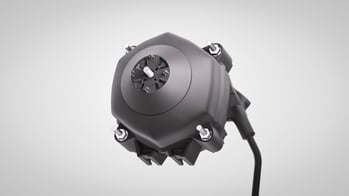 Install the motor in such a way as to protect it from any impact sources.
 - Decide which type of mount you will use:
- Basket
- Ring
- Bracket
- Rear
- Do not remove or loosen the nuts for the ‘through bolts’ as this can damage the seal between the motor housings.
- Either use flanged hex head nut with serrations or use standard nuts along with spring to fasten the motor to its mounting.
- Secure cables and wiring to avoid contact with moving parts and fan blades.
- Install cables in a way that does not put excessive strain on the cable gland.
- Mount motors in an orientation that allows cable entry from underneath or below the motor (See Basket and Ring image below). If cable orientation is from the side of the motor, you should apply a downward bend to the cable as close to the cable gland as possible to avoid water tracking into the motor. Cable entry from above is not recommended.
Mount the motor with a Basket or Ring Mounting
Secure the motor to the fan basket with four flanged nuts, or nuts and spring washers, with a required torque setting of 1.0 - 1.5Nm. 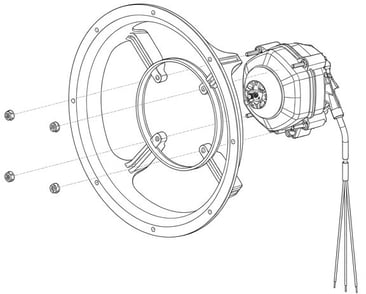
Fan basket or ring mount
Mount the motor with a Bracket Mount
Secure the motor to the bracket with two screws which are part of the Foot Mount Kit. Then insert the rectangular washers and screws into the foot mount feature on the housing (See image below) making sure that you push the screws all the way to the end of the groove.
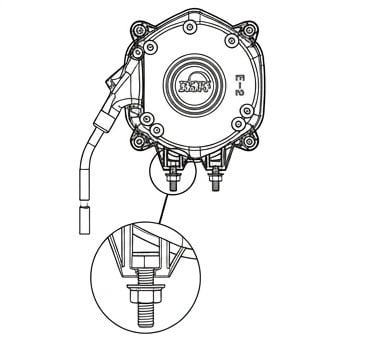
Foot Mount Kit Insertion
The image below shows the correct assembly of the motor to a foot mount bracket. The required torque setting for the two hex nuts is 2.0 – 2.2Nm.
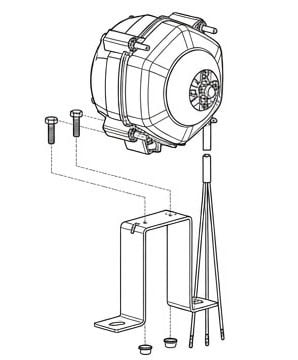
Bracket assembly
Mount the motor with a Rear Mount
NOTE: You should only use AoFrio supplied screws for this mounting option.
To rear mount a motor to a bulkhead or a sheet metal bracket, secure them with either 3 or 4 plastite screws.
As shown in the image below, below, screws may not have a penetration of more than 12mm. The required torque setting for the rear mount screws is 2.5-3.0Nm.
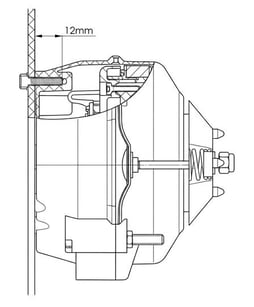
Rear mounting screw